Community SONiC gives you source code and this week’s build. The tested image, the release notes, and the support line your current vendor already includes are not part of that package.
In short: Community SONiC ships as source code, and whatever the project’s build produced that week. This article covers what the first trial leaves out, what PLVision LTS for SONiC® adds back, and how long a release stays supported once you’re running it.
You Tried SONiC. It Didn’t Work. That’s Not on You
Someone on your team downloaded a Community SONiC image, or built one, put it on a white box, and got a switch that mostly sat there. Ports down. The platform not recognized properly, or recognized but missing half the features the datasheet promised. Nobody to call. You filed it under “not ready” and moved on, and if you’re running Cisco, Arista, or Juniper today, you had every reason to.
Here’s the part that usually doesn’t reach you: what “community” means for support is exactly what you ran into. Community SONiC is the project’s source code plus whatever its own build pipeline produced most recently, tested on some hardware, not specifically for your platform. And nobody on the project is accountable for whether that image boots cleanly.
One field roundup of working network engineers put it plainly: SONiC today runs closer to “plug and pray” than to a mature, ready-made platform. A CCIE who built a full MCLAG/EVPN fabric on white-box switches reached a similar conclusion from the other direction – SONiC’s own core is solid, but it ships with no support attached, and an enterprise has to either build that support internally or buy it, the same choice long made with Linux distributions on servers.
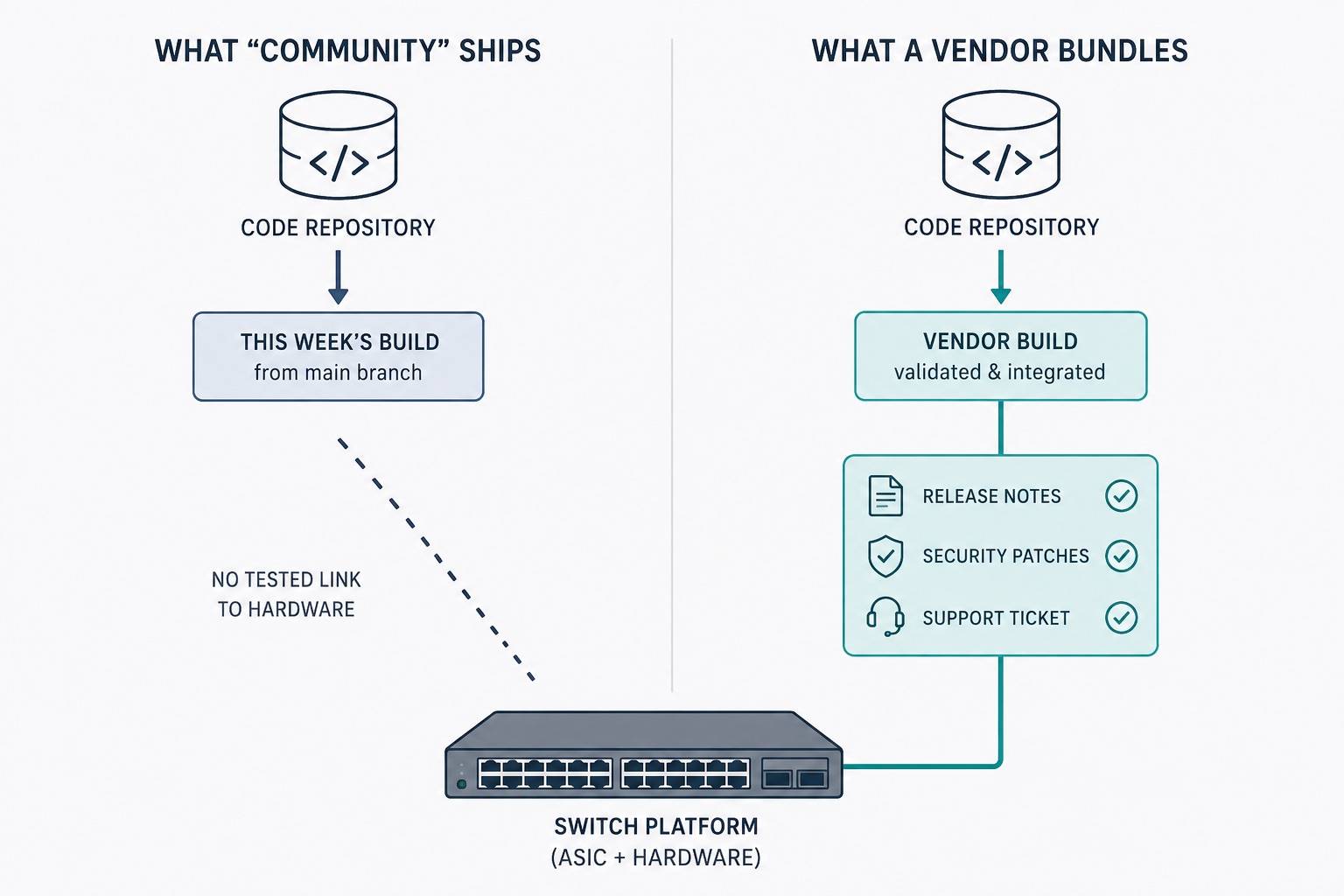
What You’re Used To – and What Community SONiC Ships Without
Every switch you’ve deployed until now came with a bundle you stopped noticing, because it was always there: an image tested for your exact platform, a release number and a date, release notes, patches that show up instead of ones you go find, a support number, an end-of-life notice years out, and an upgrade path when that date arrives.
None of that comes bundled with Community SONiC by default. It’s one project, one rolling stream of commits, and no vendor packaging that stream into a release for your platform. That’s also why it looked to you like there was nothing to choose from – no versions, no editions, just the latest commit. Wikimedia’s own engineering team ran a clean technical evaluation of SONiC against their production Juniper fleet and stated the gap in one line: with Community SONiC, there is no TAC to contact.
What Closes That Gap
For that bundle to exist, someone has to do a specific job: pick a SONiC version, make it work on named hardware, test it, keep it patched, tell you when to upgrade, and answer the phone when something breaks. PLVision, a networking software engineering company since 2007 and an active General Member Governing Board representative for the SONiC Foundation, built PLVision LTS for SONiC® to be that someone.
Download the Product Brief
The PLVision LTS for SONiC® Product Brief covers the full feature matrix by deployment model, hardware compatibility list, lifecycle timeline, support tier breakdown, comparison against Community SONiC and alternative approaches, and extension paths for requirements beyond the standard LTS scope.
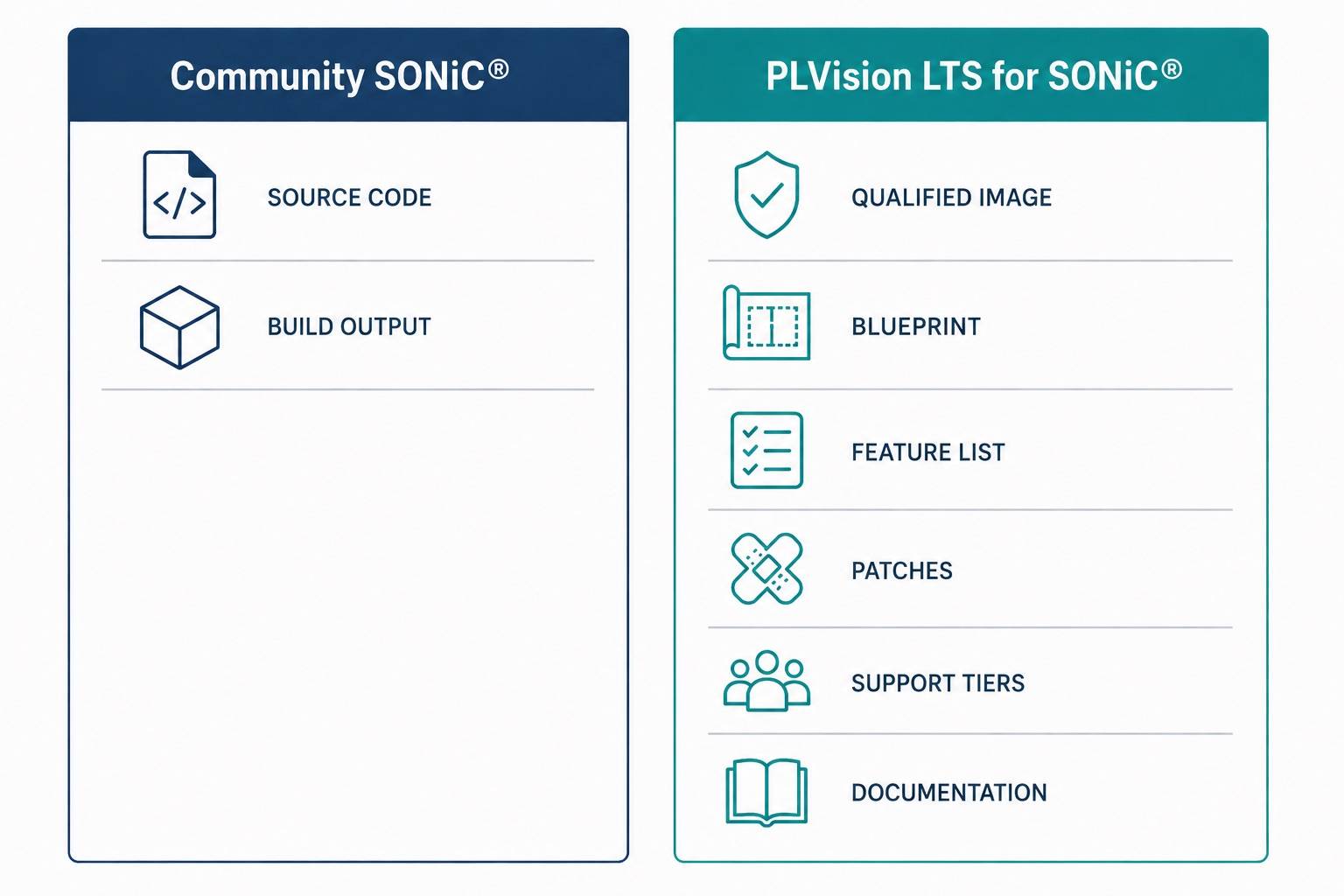
It’s a managed lifecycle wrapped around Community SONiC: PLVision picks a release, qualifies it against a defined hardware list, keeps it patched on a fixed schedule, and puts an engineering support line behind it. The code underneath is still Community SONiC – PLVision LTS for SONiC® is the qualification, patching, and support layer that turns it into something you can run the way you run everything else in your rack.
What You Get With PLVision LTS for SONiC®
- An image that runs on switches ranging 800G to 100G downlinks, each tested and qualified for its role – the same kind of platform-specific list your current vendor already publishes. See the Product Brief for the current hardware list.
- A reference design for your fabric, called a . Foundation keeps routing centralized and complexity low. Transition adds distributed routing on top of Layer 2 extension. CloudScale is built for larger fabrics that need more routing, segmentation, and multi-tenant capacity.
- A feature list that states plainly what’s in the release and what isn’t, so you’re not guessing which capabilities are in front of you.
- Patches and fixes on a five-year horizon: full patching in the first two years, fixes and backports for the next two, and security-only patches in the final year.
- Engineering support with a defined path: four tiers, from a Trial you can run before committing, up through Standard, Premium, and Enterprise, each adding more coverage hours and faster escalation.
- Deployment and operations documentation, so your team knows what to configure and what to expect once the image is running.
For How Long
A PLVision LTS for SONiC® release runs a five-year support horizon in three phases. Active covers the first two years: new features, patches, and hardware additions to the qualified list. Maintenance covers the next two years: fixes and backports keep arriving, still tested against the same hardware, but new features and new hardware stop. Security is the final year, with only security patches shipping. At the end of that five-year window, the release reaches end of life: you get an end-of-life notice and a migration path to the next baseline. You’re free to keep running the outgoing release past that point if you choose to, but support and patches stop there, so most teams plan their move to land inside the window instead of after it.
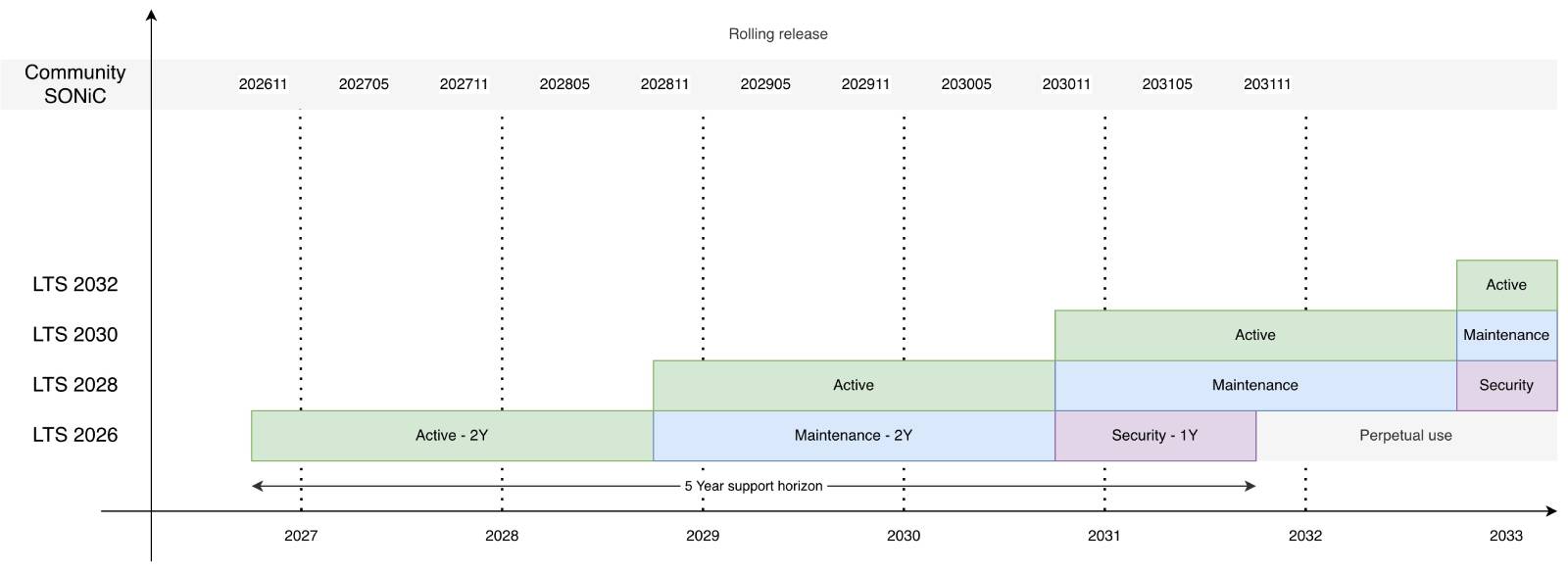
A new PLVision LTS for SONiC® baseline launches roughly every two years, with releases named for their launch year – LTS 2026, LTS 2028, LTS 2030 – so you always know how much runway is left without checking a separate table. At most three branches overlap at once, which gives you a real migration window instead of a single cutover date.
What Changes for You
Almost nothing you don’t already do. You still deploy, configure, and operate the fabric – pick a blueprint, deploy from the qualified list, run your own routing, VLANs, and day-to-day operations. What you stop doing: building images yourself, tracking GitHub commits to figure out if a fix landed, and keeping a test lab running just to validate the NOS underneath your fabric. You set the upgrade window yourself, ahead of time, instead of reacting once something breaks.
Try It Before You Decide
The Trial tier exists for exactly the situation you’re in now: a non-production lab environment, support included from the first switch you power on, so you can see whether PLVision LTS for SONiC® behaves the way this article describes before it touches a production fabric.
Have questions about fit, hardware scope, or deployment model?

- PLVision LTS for SONiC®: The Bundle Your First SONiC Trial Was Missing - September 17, 2026
- 10 Reasons NOT to Deploy
SONiC NOS in Your Network - July 12, 2024 - Choosing the Right SONiC Version for Your Network Infrastructure - May 15, 2024